Make an APT-style pop duet from two photos
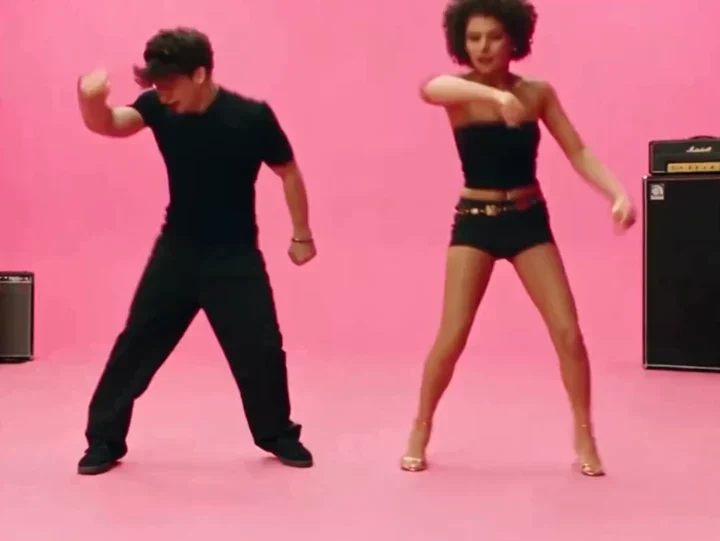
Give two people a shared stage. This APT-inspired template sets up a pink studio, playful side steps and a moving camera, ready for you to make it your own.
 AI APT Dance⇄
Start with two clear, separate photos — one performer per image.
Do not upload sensitive images. Privacy Policy
Open in editorThis two-photo workflow uses credits. The editor shows the cost before you confirm generation.
YOUR SCENE, YOUR DIRECTION
A useful starting direction
Two friends face the camera in a bright pink studio. They step to one side, clap once and finish with a relaxed shoulder bounce. Keep the camera moving gently sideways and both performers visible.
Customize this sceneBefore you upload
- One person per reference image; use photos you have permission to process.
- Keep faces unobstructed and avoid radically different body crops.
- For a closer motion match, the editor also offers a workflow using your own authorized reference clip.
From separate photos to a shared performance
Choose your two performers
Use a separate photo for each person, with a clear face and enough of the body visible to guide their pose. Similar camera angles and lighting make a more coherent starting point. Avoid collages and tightly cropped faces.
Set the scene in the editor
Continue with both photos attached. The template fills in a pink studio, coordinated steps and a five-second vertical composition. Keep that starting point or change the setting, wardrobe and camera direction before generating.
Review the movement, then download
Confirm the displayed credit cost and generate. Check both identities, hands and transitions in the preview. If you want a change, edit one part of the prompt at a time; each new generation is a separate task.
Direct a duet that feels like your idea
Two references, two roles
The prompt assigns each uploaded photo to a separate performer. Use distinct photos and describe which person should stand on each side if their placement matters.
A small sequence that fits a short clip
Side steps, a clap and a shoulder bounce give the scene a clear progression. Short, simple actions leave more room for stable faces and natural movement than a long choreography list.
Change the stage, keep the starting point
The pink backdrop is editable. Try a rehearsal room, a rooftop at sunset or a minimal white set; explain one camera movement and keep the performers together in the frame.
Your own audio direction
The preset asks for an original wordless rhythm. It does not include the commercial APT. recording or promise exact lip sync to that song. Describe the mood you want, and review the returned audio.
PAY ONCE. MAKE IT YOURS.
Choose your one-time pack
Pick how many videos you want to make. No subscription. No automatic renewal.
At this template’s starting settings: 5s · 480p · 102 credits per video.
START HERE
Credits for
3 videos
$4.99one-time
350 credits included
- No subscription or automatic renewal
- Credits valid for 12 months
- Use remaining credits on other creations
ONE-TIME PACK
Credits for
10 videos
$14.99one-time
1060 credits included
- No subscription or automatic renewal
- Credits valid for 12 months
- Use remaining credits on other creations
ONE-TIME PACK
Credits for
21 videos
$29.99one-time
2150 credits included
- No subscription or automatic renewal
- Credits valid for 12 months
- Use remaining credits on other creations
Need more? See larger one-time packs
ONE-TIME PACK
Credits for
42 videos
$59.99one-time
4350 credits included
- No subscription or automatic renewal
- Credits valid for 12 months
- Use remaining credits on other creations
ONE-TIME PACK
Credits for
71 videos
$99.00one-time
7300 credits included
- No subscription or automatic renewal
- Credits valid for 12 months
- Use remaining credits on other creations
Counts use this template’s starting settings and pack credits only. Changing the model or settings changes how many you can make. Review the quote before generating. Any daily free creations are extra.
Create regularly?
Explore subscription plansPrices in USD; applicable taxes appear before payment. See credit pack terms and the Terms of Service. Choosing a pack does not start a generation.
AI APT Dance questions
Do I need two separate photos?
Yes. This preset uses two image references, one for each performer. A single group photo is not a substitute for the two required source slots.
Does it recreate the APT. music video exactly?
No. It is an editable pop-performance prompt with its own scene and movement. It does not supply the original recording, choreography or celebrity identities, and results vary between generations.
Can I change the pink background?
Yes. Open the editor and replace the studio description with your own setting. Keep the two performers and their actions clear so the new background does not compete with the main scene.
Is this included in the daily free allowance?
The two-reference model used by this preset requires credits. The daily free allowance applies to eligible basic generations, not every model. Review the quote in the editor and see Pricing for the current plans.
What if I already started editing this template?
Your recent draft is kept in the same browser tab. Returning through this page preserves its prompt and settings; newly selected photos replace only the corresponding source slots. Expired source files need to be uploaded again.
What happens to the photos I upload?
Do not upload sensitive images. Rendastic removes local source copies after processing or within one hour. When generation sends a reference to APIMODELS, its public link may remain accessible for up to 30 days. See the Privacy Policy.
Try another scene
Make the next version yours.
Your photos. Your scene. Settings ready to adjust.
Use AI APT Dance template View one-time packs