YOUR PHOTO, A NEW SCENE
Ain’t No Mountain AI Subway Video
One photo, an empty subway car and a big sing-along moment. Create the performance, then add your chosen track when you post.
 Ain’t No Mountain⇄
Start with one clear photo. Your photo and prepared prompt continue into the editor.
Do not upload sensitive images. Privacy Policy
Create my subway videoINSIDE THE SCENE
Build the subway sing-along scene
A breakdown of the visual idea, with practical directions you can customize. The reference frames below belong to one example; they are not separate Rendastic outputs.
THE EVERYDAY SETTING
Make the carriage feel quiet
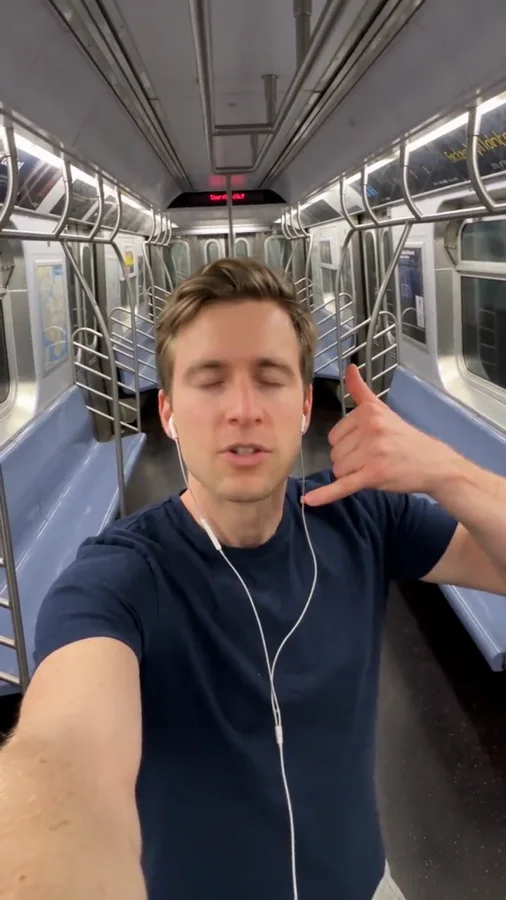
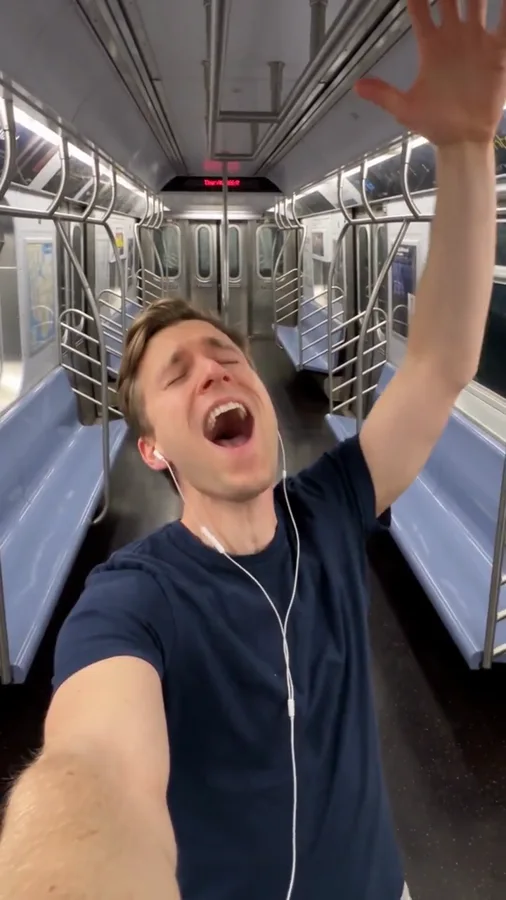
A nearly empty subway gives an ordinary commute room to turn into a private concert. Keep the rails, window and seat visible enough to establish the location without pulling attention away from the face.
- Use a mid-torso phone-camera view.
- Leave a little carriage background visible.
- Keep other passengers out of the main action.
THE BIG FEELING
Use one expressive gesture
Closed eyes, a slight head tilt and a raised hand communicate the sing-along moment. The scene does not need elaborate dance steps. Leave space above and beside the head so the gesture stays in frame.
- Choose one hand movement.
- Let the expression build, then settle.
- Finish on a smile or knowing glance.
YOUR FINAL EDIT
Add the song after the scene is ready
The template creates a silent performance clip. Place your permitted recording or the publishing app’s licensed sound beneath it, then choose the strongest moment for your cut. Exact lyric-level synchronization is a separate editing task.
- Keep the original downloadable clip.
- Select audio where you are allowed to use it.
- Trim the scene to your chosen musical moment.
MADE TO BE CUSTOMIZED
From your photo to your own version
The subway scene is prepared
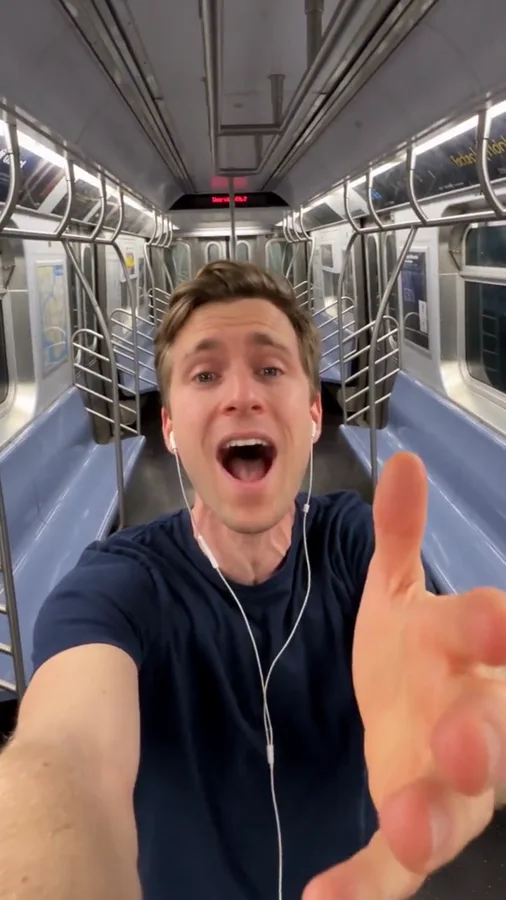
The prompt includes the carriage, wired earphones, phone-camera framing and a simple expressive performance.
A personal photo reference
Start from one face-visible portrait. The editor lets you change the outfit, expression or final gesture before generating.
Music stays in your edit
The default silent output lets you choose sound and timing in your publishing app. No commercial song is bundled with the generation.
YOUR SCENE, YOUR DIRECTION
What is the Ain’t No Mountain subway trend?
This sing-along format pairs a familiar subway commute with an unusually wholehearted performance. The earphones, closed eyes and raised hand make the visual idea recognizable. Rendastic creates the character performance from your photo; add a permitted soundtrack separately to complete your version.
Customize this sceneChoose a photo that gives the scene a clear starting point
- Use one clear chest-up portrait with visible eyes and mouth.
- Keep hands away from the face in the reference photo.
- Allow room for the raised hand in the scene framing.
- For a pet version, rewrite the posture and gestures for a clearly fictional animal performance.
FROM PHOTO TO FINISHED TAKE
How to make your Ain’t No Mountain video
Upload your performer
Choose one portrait you have permission to use. You do not need to take the photo on public transport.
Prepare the subway performance
Open the editor, adjust the gesture or expression and review the silent 15-second recipe and current quote.
Add music to your downloaded clip
Generate and download the scene. Assemble the final post with your permitted audio and captions in your preferred publishing app.
FIND YOUR WAY TO THE MEME
Ain’t No Mountain AI: Rendastic and MakeViral workflows
Compare what you need to prepare and what each named template creates. Different input methods and output settings suit different edits; raw credit units are not equivalent across services.
Swipe or scroll sideways to compare all tools
| Your decision | RendasticAin’t No Mountain templateThis template | MakeViralSubway singing template |
|---|---|---|
| Photo input | One performer photo | One performer or pet photo |
| Performance direction | Editable subway scene and expressive gesture; add permitted audio afterward | Named subway singing scene |
| Starting output | 15 seconds, vertical, silent | 10-second vertical clip with sound |
Scope: the named public templates, not all features on either platform. This is a workflow comparison, not a quality or speed ranking. Rendastic pricing comes from the current editor quote.
Sources checked : MakeViral Ain’t No Mountain AI template
Start here when you want to customize the prepared prompt and keep your photo, settings and draft together in the Rendastic editor.
Create my subway videoABOUT THIS CREATION
Your creation and the trend reference
Make the scene yours. Use photos you have permission to process and share the result responsibly.
- This workflow creates a new video scene from your input. The public reference is shown to explain the trend; it is not submitted as generation footage.
- Use your own photo or obtain permission from the person depicted. Do not present a fictional scene as a real event involving someone else.
- The template is independently prepared by Rendastic. Referenced creators and platforms do not endorse or operate this service.
BEFORE YOU UPLOAD
Your photos and the creation process
What happens to uploaded photos?
Your photo is processed to guide the requested creation. Local source files are removed after processing or within one hour. Generation-provider reference links can remain publicly accessible for up to 30 days; local deletion does not remove that provider copy.
Keep control of what you submit
Use images you have permission to process. Read the Privacy Policy for processor, retention and deletion details before uploading material that should remain confidential.
PAY ONCE. MAKE IT YOURS.
Choose your one-time pack
Pick how many videos you want to make. No subscription. No automatic renewal.
At this template’s starting settings: 15s · 480p · 199 credits per video.
START HERE
Credits for
1 video
$4.99one-time
350 credits included
- No subscription or automatic renewal
- Credits valid for 12 months
- Use remaining credits on other creations
ONE-TIME PACK
Credits for
5 videos
$14.99one-time
1060 credits included
- No subscription or automatic renewal
- Credits valid for 12 months
- Use remaining credits on other creations
ONE-TIME PACK
Credits for
10 videos
$29.99one-time
2150 credits included
- No subscription or automatic renewal
- Credits valid for 12 months
- Use remaining credits on other creations
Need more? See larger one-time packs
ONE-TIME PACK
Credits for
21 videos
$59.99one-time
4350 credits included
- No subscription or automatic renewal
- Credits valid for 12 months
- Use remaining credits on other creations
ONE-TIME PACK
Credits for
36 videos
$99.00one-time
7300 credits included
- No subscription or automatic renewal
- Credits valid for 12 months
- Use remaining credits on other creations
Counts use this template’s starting settings and pack credits only. Changing the model or settings changes how many you can make. Review the quote before generating. Any daily free creations are extra.
Create regularly?
Explore subscription plansPrices in USD; applicable taxes appear before payment. See credit pack terms and the Terms of Service. Choosing a pack does not start a generation.
A FEW THINGS WORTH KNOWING
Ain’t No Mountain questions
How do I make an Ain’t No Mountain subway AI video?
Upload one portrait and open the prepared subway scene in the editor. Generate the performance, download it and add permitted music in your editing or publishing app.
Is Ain’t No Mountain High Enough included as audio?
No. This template generates a silent clip and does not supply the song, lyrics or a recording. Use music available to you under the rules of your publishing platform.
Does this synchronize the lips to the original song?
No. This preset directs a visual sing-along performance without an audio input. Exact synchronization to a recording requires a separate supported audio-driven workflow or editing.
Do I need a subway photo?
No. Your portrait supplies the character. The prepared prompt describes the carriage, earphones and camera position.
Can I make a pet subway performance?
You can adapt the prompt for a pet and describe a clearly fictional performance with natural animal proportions. A clear face and distinctive markings help the reference.
Can I create a group subway chorus?
This template uses one photo and one main performer. A group scene needs a different prompt and input plan; it is not the default workflow shown here.
Is this template free, and how much does it cost?
This preset uses paid credits: 199 Rendastic credits · 15s / 480p. A one-time pack starts at $4.99 for 350 credits, valid for 12 months. The editor shows your current quote before generation; the cost changes with supported model and output settings.
Where can I use the completed result?
You can download the completed result and prepare it for your chosen social platform. Use photos and added audio you have permission to use, follow that platform’s AI-labeling requirements, and read our Terms for applicable content rules.
MAKE YOUR NEXT TAKE
Turn an ordinary commute into your big moment.
Start with one photo, review the prepared directions and continue in the editor.
Use Ain’t No Mountain template View one-time packs