YOUR PHOTO, A NEW SCENE
Fridge POV AI Video Generator
One photo. One midnight snack. Put your character on the other side of the fridge door, caught with a spoon in hand.
 Fridge POV⇄
Start with one clear photo. Your photo and prepared prompt continue into the editor.
Do not upload sensitive images. Privacy Policy
Make my fridge POVINSIDE THE SCENE
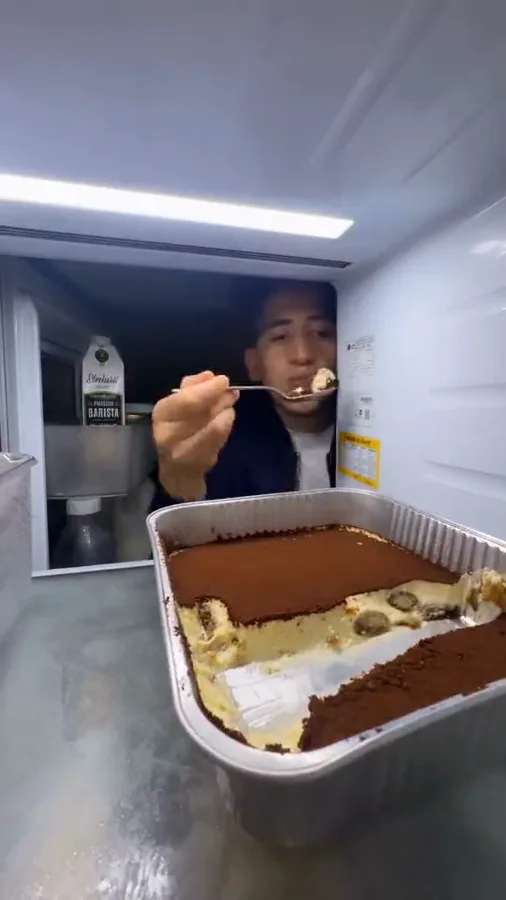
Inside the midnight fridge raid
A breakdown of the visual idea, with practical directions you can customize. The reference frames below belong to one example; they are not separate Rendastic outputs.
THE CAMERA IS THE JOKE
Build the view from inside the refrigerator
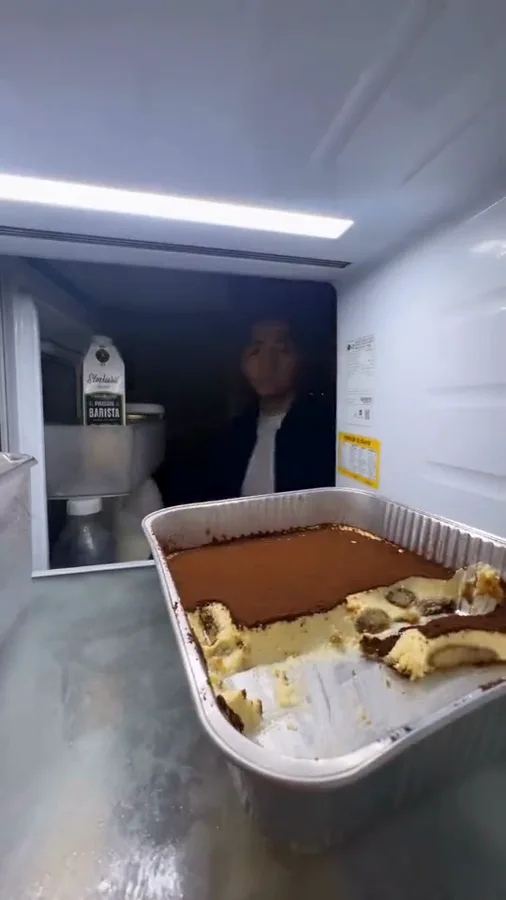
Let the shelf edge and dessert establish where the camera sits. The viewer should feel hidden behind the food, looking into the kitchen. Moving the camera outside turns it into a different kind of cooking clip.
- Keep the camera fixed at shelf height.
- Leave the face visible above the dessert.
- Let the fridge light do the lighting.
ONE BITE, THEN ANOTHER
Give the snack raid a small story
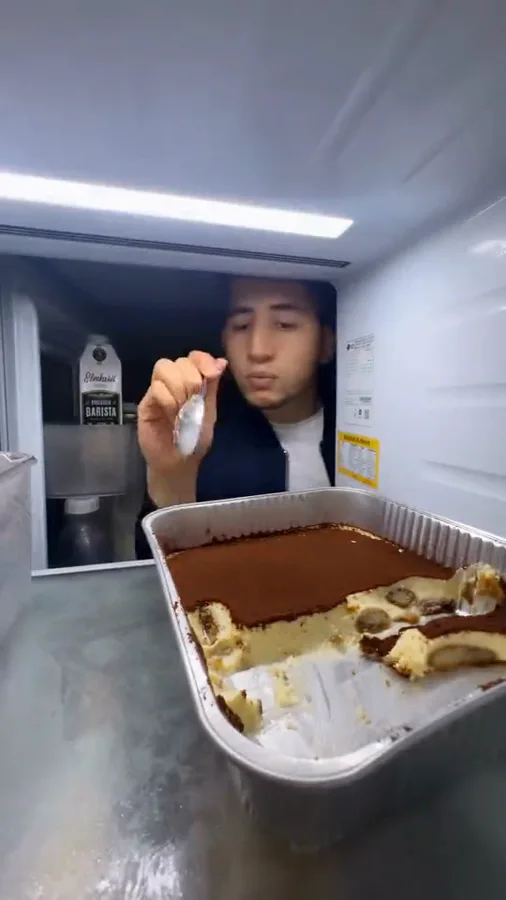
A glance toward the hallway makes the first spoonful feel secret. The return after the door closes provides the punchline. Ask for a short sequence of readable actions instead of an entire meal.
- Start with a glance, then one bite.
- Use the door closure as a natural pause.
- End on the guilty look or second reach.
MAKE IT PERSONAL
Change the snack without losing the setup
Tiramisu is the recognizable reference, but your version can use cheesecake, leftover birthday cake or a single pudding cup. Keep the container simple and describe the dessert in the editable prompt.
- Choose one dessert and one utensil.
- Use a familiar outfit from the reference photo.
- Add your own caption when posting.
MADE TO BE CUSTOMIZED
From your photo to your own version
A scene ready to direct
The prepared prompt includes the refrigerator viewpoint, door transition and return for another bite. Change the snack or reaction in the editor.
A photo is enough to start
You do not need to photograph yourself inside a refrigerator. Upload one clear character photo; the prompt describes the new setting.
A vertical clip for your edit
The starting recipe is 15 seconds in 9:16. Download the completed video, then add captions or your selected platform audio.
YOUR SCENE, YOUR DIRECTION
What is the Fridge POV trend?
Fridge POV places the viewer inside a refrigerator while someone sneaks a snack. The current tiramisu variation makes the repeated return for dessert the punchline. Rendastic prepares a new photo-guided scene with this inside-the-fridge setup; the displayed reference explains the visual idea.
Customize this sceneChoose a photo that gives the scene a clear starting point
- Use a sharp, well-lit photo of one adult, with both eyes visible.
- A chest-up image gives the model useful clothing and shoulder details.
- Leave masks, heavy face filters and several people out of the source photo.
- For a pet adaptation, rewrite the action to suit the animal rather than asking for human hands.
FROM PHOTO TO FINISHED TAKE
How to make your Fridge POV video
Choose your snack thief
Upload one portrait you have permission to use. You can start from an ordinary photo; a kitchen background is unnecessary.
Personalize the midnight raid
Open the editor with your photo and prepared scene. Choose the dessert, adjust the final reaction and review the current credit quote.
Generate, download and caption
Generate in the editor. Download the completed clip and add a short caption or licensed sound in your publishing app.
FIND YOUR WAY TO THE MEME
Fridge POV: Rendastic and MakeViral workflows
Compare what you need to prepare and what each named template creates. Different input methods and output settings suit different edits; raw credit units are not equivalent across services.
Swipe or scroll sideways to compare all tools
| Your decision | RendasticFridge POV templateThis template | MakeViralSolo, Two eaters and Pet templates |
|---|---|---|
| Photo inputs | One character photo | One photo for Solo/Pet; two for Two eaters |
| Scene direction | Editable fridge-camera prompt with a return-for-another-bite sequence | Named tiramisu variants based on its reference clips |
| Starting output | 15 seconds, vertical, silent | 10-second vertical clip with sound |
Scope: the named public templates, not all features on either platform. This is a workflow comparison, not a quality or speed ranking. Rendastic pricing comes from the current editor quote.
Sources checked : MakeViral Fridge POV template
Start here when you want to customize the prepared prompt and keep your photo, settings and draft together in the Rendastic editor.
Make my fridge POVABOUT THIS CREATION
Your creation and the trend reference
Make the scene yours. Use photos you have permission to process and share the result responsibly.
- This workflow creates a new video scene from your input. The public reference is shown to explain the trend; it is not submitted as generation footage.
- Use your own photo or obtain permission from the person depicted. Do not present a fictional scene as a real event involving someone else.
- The template is independently prepared by Rendastic. Referenced creators and platforms do not endorse or operate this service.
BEFORE YOU UPLOAD
Your photos and the creation process
What happens to uploaded photos?
Your photo is processed to guide the requested creation. Local source files are removed after processing or within one hour. Generation-provider reference links can remain publicly accessible for up to 30 days; local deletion does not remove that provider copy.
Keep control of what you submit
Use images you have permission to process. Read the Privacy Policy for processor, retention and deletion details before uploading material that should remain confidential.
PAY ONCE. MAKE IT YOURS.
Choose your one-time pack
Pick how many videos you want to make. No subscription. No automatic renewal.
At this template’s starting settings: 15s · 480p · 199 credits per video.
START HERE
Credits for
1 video
$4.99one-time
350 credits included
- No subscription or automatic renewal
- Credits valid for 12 months
- Use remaining credits on other creations
ONE-TIME PACK
Credits for
5 videos
$14.99one-time
1060 credits included
- No subscription or automatic renewal
- Credits valid for 12 months
- Use remaining credits on other creations
ONE-TIME PACK
Credits for
10 videos
$29.99one-time
2150 credits included
- No subscription or automatic renewal
- Credits valid for 12 months
- Use remaining credits on other creations
Need more? See larger one-time packs
ONE-TIME PACK
Credits for
21 videos
$59.99one-time
4350 credits included
- No subscription or automatic renewal
- Credits valid for 12 months
- Use remaining credits on other creations
ONE-TIME PACK
Credits for
36 videos
$99.00one-time
7300 credits included
- No subscription or automatic renewal
- Credits valid for 12 months
- Use remaining credits on other creations
Counts use this template’s starting settings and pack credits only. Changing the model or settings changes how many you can make. Review the quote before generating. Any daily free creations are extra.
Create regularly?
Explore subscription plansPrices in USD; applicable taxes appear before payment. See credit pack terms and the Terms of Service. Choosing a pack does not start a generation.
A FEW THINGS WORTH KNOWING
Fridge POV questions
How do I make a Fridge POV AI video from my photo?
Upload one clear portrait here, open the prepared editor, and review the fridge-camera scene before generating. The default makes a new 15-second vertical video.
Do I need the original tiramisu video?
No. This workflow uses your photo and an editable scene prompt. The preview is a trend reference and is not submitted as motion footage.
Can I choose a different dessert?
Yes. Replace the dessert description in the editor with cake, pudding or another snack. Keep one main container so the scene stays easy to follow.
Can two different people raid the fridge?
This preset uses one photo and one character. For two eaters, prepare a separate multi-reference creation rather than uploading both people into the single-character slot.
Why does the fridge door matter?
The dark frame when the door closes separates the first snack from the return. Keep that beat in the prompt if you want the repeat-offender joke.
Does the video include the viral soundtrack?
No. The starting recipe is silent. Add audio you are allowed to use in your video editor or publishing platform.
Is this template free, and how much does it cost?
This preset uses paid credits: 199 Rendastic credits · 15s / 480p. A one-time pack starts at $4.99 for 350 credits, valid for 12 months. The editor shows your current quote before generation; the cost changes with supported model and output settings.
Where can I use the completed result?
You can download the completed result and prepare it for your chosen social platform. Use photos and added audio you have permission to use, follow that platform’s AI-labeling requirements, and read our Terms for applicable content rules.
MAKE YOUR NEXT TAKE
Who keeps coming back for one more bite?
Start with one photo, review the prepared directions and continue in the editor.
Use Fridge POV template View one-time packs