STORY TO COMIC ART
Give your story its first comic page.
A mysterious envelope. A stranger at the window. A reveal in the last panel. Turn a few story beats into an illustrated page, then make the words your own.
 AI Comic⇄
Start with the story below. Change the character, setting and reveal here, then continue to the image editor. No photo is needed.
Eligible for the daily free allowance · Review settings in the editor.
Open comic editorINSIDE THE SCENE
Build a comic the reader can follow
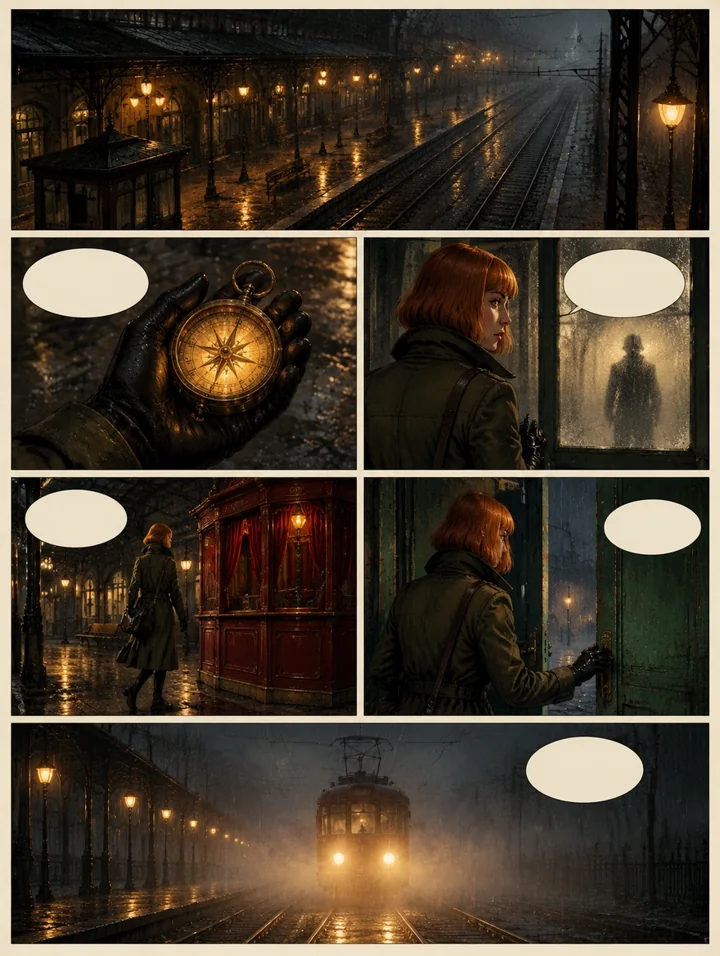
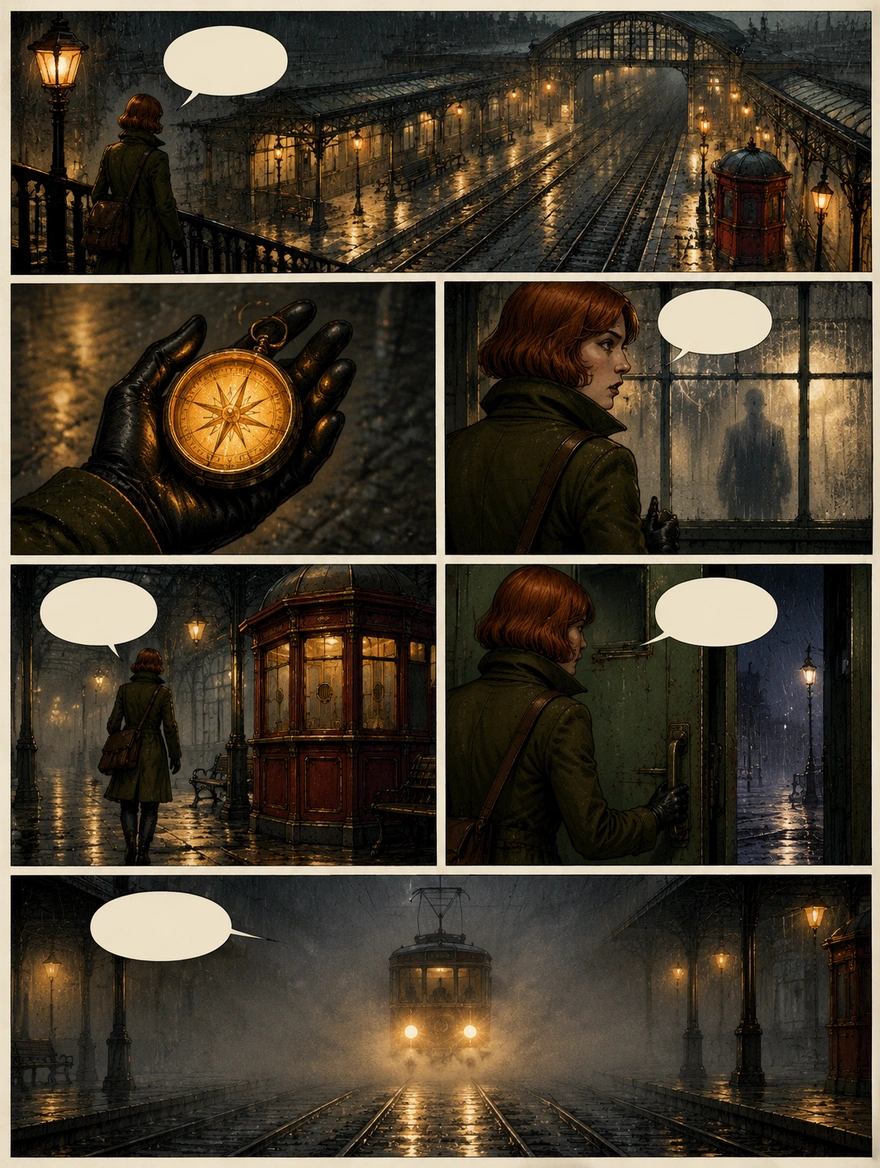
Two original Rendastic renditions of the same tram-station story show how framing and space shape a page. These are story studies, not two different templates or customer submissions.
01 · GIVE THE READER A CLUE
Let one object pull the story forward.
The compass gives this scene a thread: first the station, then the discovery, then the figure beyond the glass. In your own prompt, choose one object that matters and describe what changes when the character finds it.
- Open with the place before moving closer to the character.
- Give each beat one action: notice, pick up, turn or reveal.
- Name a recurring color or prop to connect the scenes.
02 · LEAVE ROOM FOR THE WORDS
Draw the moment. Add the dialogue later.
This separate rendition leaves open balloons above the character and alongside the action. Asking for blank speech bubbles lets you choose the final wording, font and reading order after downloading the image. Use short lines that add something the picture does not already say.
- Ask for empty speech balloons and clear gutters.
- Keep important faces and objects away from the intended lettering area.
- Download the page, then add editable text in your preferred layout tool.
MADE TO BE CUSTOMIZED
Start with a story, not an empty canvas
Comic direction already prepared
The starter prompt includes ink outlines, a limited palette, panel gutters and a final close-up. Replace the mystery while keeping the visual structure.
Your words remain editable
Write on this page and continue with the same prompt in the image editor. Return to revise it without starting the template again.
Choose a page shape
Begin with the portrait preset or choose a supported aspect ratio in the editor. Describe how the opening and final moments should occupy the page.
Artwork you can finish your way
Download the generated page as an image. Add your own lettering, titles and page numbers in a design application.
YOUR SCENE, YOUR DIRECTION
What does an AI comic prompt need?
A useful comic prompt is a small scene plan: who is here, where they are, what they notice and what the last panel reveals. The starter uses a detective, a rainy cafe and a red envelope. Keep that structure or replace it with an original scene from your own story.
Customize this sceneA short brief that gives the page direction
- Describe one lead character once, including a few recognizable clothing details.
- List the important beats in reading order. Use a wide opening, a detail shot and a closing reveal.
- Choose a small palette and describe the lighting across the whole page.
- Request blank balloons. Keep exact dialogue outside the image-generation prompt if you intend to letter it later.
FROM STORY BEATS TO COMIC PAGE
From a story idea to an illustrated page
Write the scene
Edit the prepared story above. Name the character, place, key object and ending; include the framing you want.
Review in the image editor
Open the comic editor with your draft. Check the aspect ratio, quality and current free allowance or credit quote before generating.
Download and letter
Once the image is ready, download it from your work. Add dialogue and captions in a separate design tool, then export for your intended format.
CHOOSE YOUR CREATIVE WORKFLOW
Rendastic, Firefly or Canva: choose your comic workflow
Generating artwork and arranging a finished comic are different jobs. Compare these specific workflows by the material you start with and the decisions you want to control.
Swipe or scroll sideways to compare all tools
| Your decision | RendasticPrepared AI Comic promptThis template | Adobe FireflyGenerate Image + composition reference | CanvaComic Strip Maker |
|---|---|---|---|
| Starting material | A story prompt; no photo required | A prompt and a composition reference image | A comic template, drawings or uploaded images |
| Page composition | Describe panel sequence and framing in the prompt | Guide generated variations with a reference and strength setting | Arrange images in adjustable grids and frames |
| Dialogue workflow | Request blank balloons; add lettering after download | Create artwork with the generation workflow | Add fonts and speech-bubble elements in the design |
| Useful when | You want a ready comic-art prompt to adapt to your story | You have a visual composition to guide new artwork | You want to place panels and letter a designed page |
| This preset’s starting cost | Eligible for the daily free allowance | Check Adobe’s current plan and generation terms | Check Canva’s current plan and chosen assets |
Scope: the named workflows, not every feature on each platform. Competitor descriptions come from their documentation; no comparative output-quality or speed test was performed. Prices and free eligibility can depend on account and settings.
Sources checked : Adobe: composition-reference controls Canva: grids, sketches and lettering
Choose Rendastic to start with comic-specific art direction and an editable story. Choose a layout workflow when precise panel placement and editable lettering are the main task.
Open comic editorABOUT THIS CREATION
Original stories, responsibly shared
Tell an original story and share your artwork responsibly.
- This workflow generates new comic artwork from your description. It does not include panels, dialogue or characters taken from an existing comic book.
- Use your own stories and characters, or material you have permission to adapt. Naming a publisher, artist or franchise does not provide a license or imply their endorsement.
- When sharing, describe the work accurately as AI-assisted where relevant. Do not use it to impersonate a real person or falsely present a scene as evidence of an actual event.
BEFORE YOU CREATE
Your story and your source material
No photo required
The prepared comic workflow starts with text. Avoid including private conversations, personal identifiers or confidential story material you are not permitted to process.
Processing and saved drafts
The image is generated when you submit in the editor, not when you open this page. Same-tab drafts let you carry the prompt into the editor; full processing and retention terms are in our Privacy Policy.
If you switch to image editing
Uploaded references follow the existing upload policy: local files are removed after processing or within one hour. The generation processor can retain publicly accessible reference links for up to 30 days. Local deletion does not remove that copy.
PAY ONCE. MAKE IT YOURS.
Choose your one-time pack
Pick how many images you want to make. No subscription. No automatic renewal.
At this template’s starting settings: 1K · 6 credits per image.
START HERE
Credits for
58 images
$4.99one-time
350 credits included
- No subscription or automatic renewal
- Credits valid for 12 months
- Use remaining credits on other creations
ONE-TIME PACK
Credits for
176 images
$14.99one-time
1060 credits included
- No subscription or automatic renewal
- Credits valid for 12 months
- Use remaining credits on other creations
ONE-TIME PACK
Credits for
358 images
$29.99one-time
2150 credits included
- No subscription or automatic renewal
- Credits valid for 12 months
- Use remaining credits on other creations
Need more? See larger one-time packs
ONE-TIME PACK
Credits for
725 images
$59.99one-time
4350 credits included
- No subscription or automatic renewal
- Credits valid for 12 months
- Use remaining credits on other creations
ONE-TIME PACK
Credits for
1216 images
$99.00one-time
7300 credits included
- No subscription or automatic renewal
- Credits valid for 12 months
- Use remaining credits on other creations
Counts use this template’s starting settings and pack credits only. Changing the model or settings changes how many you can make. Review the quote before generating. Any daily free creations are extra.
This preset is also eligible for your daily free allowance when available. Credit packs give you a balance for more creations.
Create regularly?
Explore subscription plansPrices in USD; applicable taxes appear before payment. See credit pack terms and the Terms of Service. Choosing a pack does not start a generation.
A FEW THINGS WORTH KNOWING
AI Comic questions
Do I need to upload a photo to make an AI comic?
No. This template starts from a written story and uses text-to-image generation. The prompt is ready to edit before you open the image editor.
Can I change the cafe story in the starter prompt?
Yes. Replace the detective, cafe and envelope with your own character, setting and important object. Keep a clear sequence of actions and describe the final reveal.
Will I get separate editable comic panels?
The output is one image of a comic page. It is not a layered layout or a set of individually editable panels. Use a design tool after downloading if you need to arrange panels or add text.
Can I request a specific number of panels?
You can describe the number, order and size of panels in the prompt. The model interprets that layout rather than following a fixed grid. For exact panel dimensions, create or arrange the final layout in a design tool.
How do I add dialogue to the comic?
The starter asks for blank speech bubbles. Download the image and add dialogue with editable text in a separate design tool. This lets you control spelling, font size and reading order.
Is the AI Comic template included in the free allowance?
The default GPT Image 2.5 Flare setup at 1K and medium quality is eligible for the shared daily free allowance when available. Changing the model or quality can require paid credits. The editor shows the applicable quote before you submit.
Are the examples the output of the default cafe prompt?
No. The two examples are original Rendastic generations of a courier in a tram station. They demonstrate comic composition with a different story prompt; the current editable starter is a cafe mystery.
Can I use my comic commercially?
Use material you have the rights to use and review the generated image before publishing. Access to the tool does not grant rights to another person’s likeness, copyrighted characters or trademarks. Review our Terms of Service for the applicable usage conditions.
MAKE YOUR NEXT TAKE
What happens in your last panel?
Set the scene, plant a clue and leave the reader with a reveal. Your comic draft is ready to continue in the editor.
Use AI Comic template View one-time packs