YOUR PHOTO, A NEW SCENE
ATM Glitch AI Video Generator
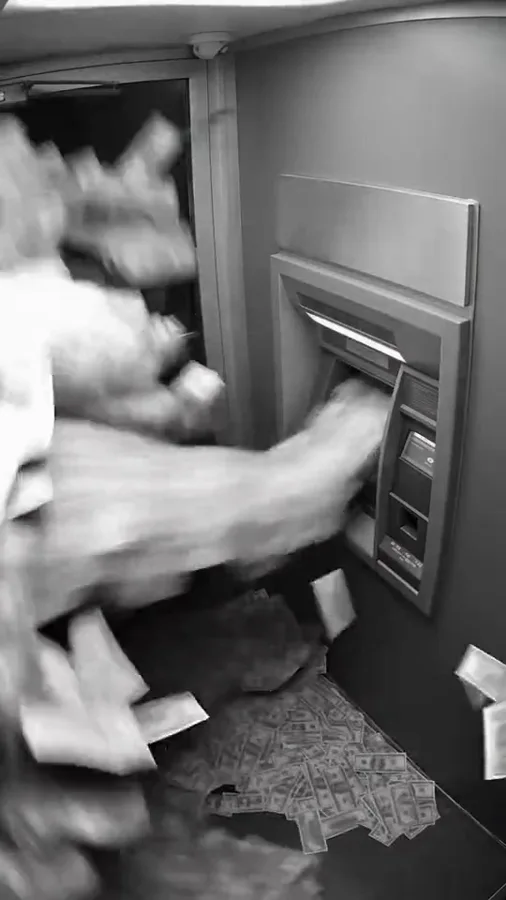
Your character meets an impossible cash machine. Make a fictional CCTV-style money-burst scene from one photo.
 ATM Glitch⇄
Start with one clear photo. Your photo and prepared prompt continue into the editor.
Do not upload sensitive images. Privacy Policy
Create my ATM sceneINSIDE THE SCENE
Inside the fictional cash-burst scene
A breakdown of the visual idea, with practical directions you can customize. The reference frames below belong to one example; they are not separate Rendastic outputs.
SECURITY-CAMERA FRAMING
Give the cash room to fall
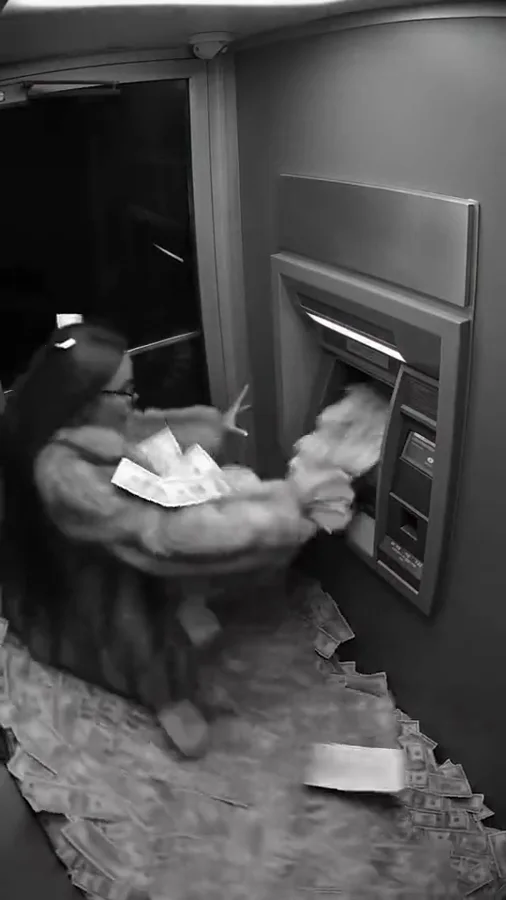
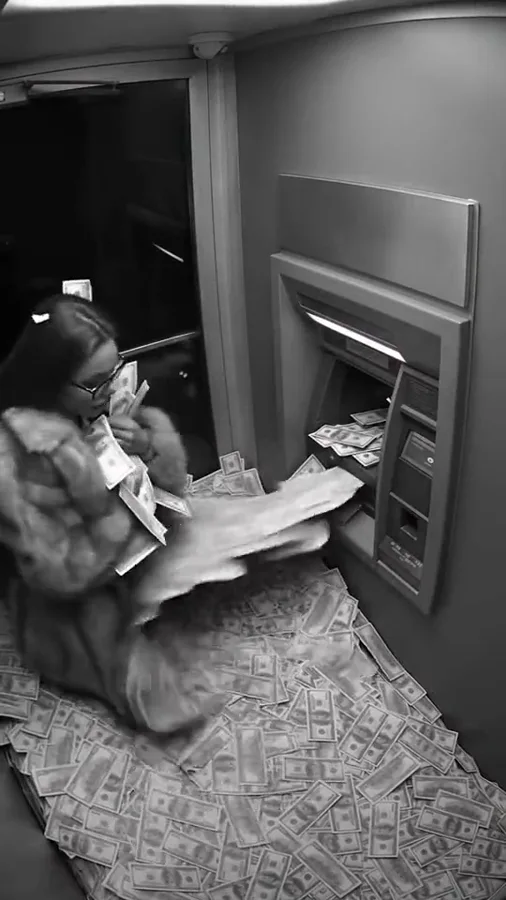
The high corner view shows the person, machine and floor together. A tight face shot would hide the accumulating paper; a very distant shot would lose the reaction. Keep all three elements readable.
- Use one fixed corner viewpoint.
- Leave visible floor around the character.
- Keep the machine unbranded.
THE IMPOSSIBLE PAYOFF
Build a burst, then a reaction
The cash storm is the visual payoff. A short wait makes the change feel sudden; a step back and look toward the camera give the character a clear response without adding a dangerous stunt.
- Start with a calm beat.
- Use fluttering prop notes as the effect.
- Finish with a readable surprised look.
A MEME, NOT A MONEY CLAIM
Make the fiction clear when you post
CCTV styling can look like documentary evidence. Present your finished clip as an AI cash-burst joke. Add a playful caption about a dream scenario rather than suggesting that an actual bank machine pays out free money.
- Describe the post as an AI scene.
- Avoid bank names or real account details.
- Keep the joke focused on the reaction.
MADE TO BE CUSTOMIZED
From your photo to your own version
Prepared CCTV art direction
The prompt includes the fixed high camera, monochrome texture and full-room framing needed for the money-burst gag.
A controlled visual sequence
Waiting, cash burst and reaction are already ordered in the scene. Adjust the outfit or final gesture in the editor.
One photo to begin
No filming at a bank or source CCTV footage is needed. Your reference photo supplies the character for a newly generated scene.
YOUR SCENE, YOUR DIRECTION
What is the ATM Glitch AI trend?
ATM Glitch is a fictional cash-burst meme: a security-camera view shows a machine releasing an impossible shower of money. The effect is a visual joke, not evidence of a real banking exploit. Rendastic prepares a photo-guided version with prop cash and a surprised character.
Customize this sceneChoose a photo that gives the scene a clear starting point
- Use a well-lit portrait or three-quarter body photo with the face visible.
- A distinct jacket or outfit helps the character read from the wider camera angle.
- Keep the ATM, person and floor in one frame in your scene directions.
- Ask for a safe reaction rather than a fall or collision.
FROM PHOTO TO FINISHED TAKE
How to make your ATM Glitch video
Choose the surprised character
Upload one photo you have permission to use. The scene prompt adds the fictional ATM lobby.
Review the cash-burst scene
Open the editor, adjust framing or reaction, and review the supported settings and credit quote.
Generate the fictional clip
Download the completed video and add an AI-comedy caption before sharing. No real bank footage or account information is needed.
FIND YOUR WAY TO THE MEME
ATM Glitch AI: Rendastic and MakeViral workflows
Compare what you need to prepare and what each named template creates. Different input methods and output settings suit different edits; raw credit units are not equivalent across services.
Swipe or scroll sideways to compare all tools
| Your decision | RendasticATM Glitch templateThis template | MakeViralCCTV cash-burst template |
|---|---|---|
| Photo input | One character photo | One person or pet photo |
| Scene direction | Editable new CCTV scene with prop cash and a safe surprised reaction | Reference-clip-based ATM scene |
| Starting output | 15 seconds, vertical, silent | 8-second vertical clip with sound |
Scope: the named public templates, not all features on either platform. This is a workflow comparison, not a quality or speed ranking. Rendastic pricing comes from the current editor quote.
Sources checked : MakeViral ATM Glitch AI template
Start here when you want to customize the prepared prompt and keep your photo, settings and draft together in the Rendastic editor.
Create my ATM sceneABOUT THIS CREATION
Your creation and the trend reference
Make the scene yours. Use photos you have permission to process and share the result responsibly.
- This workflow creates a new video scene from your input. The public reference is shown to explain the trend; it is not submitted as generation footage.
- The cash burst is fictional. Do not describe the generated clip as proof of a real ATM exploit, bank payout or financial opportunity.
- The template is independently prepared by Rendastic. Referenced creators and platforms do not endorse or operate this service.
BEFORE YOU UPLOAD
Your photos and the creation process
What happens to uploaded photos?
Your photo is processed to guide the requested creation. Local source files are removed after processing or within one hour. Generation-provider reference links can remain publicly accessible for up to 30 days; local deletion does not remove that provider copy.
Keep control of what you submit
Use images you have permission to process. Read the Privacy Policy for processor, retention and deletion details before uploading material that should remain confidential.
PAY ONCE. MAKE IT YOURS.
Choose your one-time pack
Pick how many videos you want to make. No subscription. No automatic renewal.
At this template’s starting settings: 15s · 480p · 199 credits per video.
START HERE
Credits for
1 video
$4.99one-time
350 credits included
- No subscription or automatic renewal
- Credits valid for 12 months
- Use remaining credits on other creations
ONE-TIME PACK
Credits for
5 videos
$14.99one-time
1060 credits included
- No subscription or automatic renewal
- Credits valid for 12 months
- Use remaining credits on other creations
ONE-TIME PACK
Credits for
10 videos
$29.99one-time
2150 credits included
- No subscription or automatic renewal
- Credits valid for 12 months
- Use remaining credits on other creations
Need more? See larger one-time packs
ONE-TIME PACK
Credits for
21 videos
$59.99one-time
4350 credits included
- No subscription or automatic renewal
- Credits valid for 12 months
- Use remaining credits on other creations
ONE-TIME PACK
Credits for
36 videos
$99.00one-time
7300 credits included
- No subscription or automatic renewal
- Credits valid for 12 months
- Use remaining credits on other creations
Counts use this template’s starting settings and pack credits only. Changing the model or settings changes how many you can make. Review the quote before generating. Any daily free creations are extra.
Create regularly?
Explore subscription plansPrices in USD; applicable taxes appear before payment. See credit pack terms and the Terms of Service. Choosing a pack does not start a generation.
A FEW THINGS WORTH KNOWING
ATM Glitch questions
Is the ATM Glitch trend a real way to get money?
No. This page creates a fictional AI video with an impossible shower of prop cash. It does not describe or perform a banking exploit.
What do I upload for the ATM Glitch AI video?
One clear photo of your character. A portrait or three-quarter body image with recognizable clothing works as the reference.
Does the tool need footage of an ATM?
No. The prepared prompt describes the room, camera and machine. The display preview is a trend reference, not your generation input.
Can I change the CCTV look?
Yes. Edit the prompt to change monochrome to color or adjust the viewpoint. Keep a fixed wide shot if you want the floor and cash burst visible together.
Can I use real bank logos or account screenshots?
They are unnecessary for this effect. The prepared scene uses an unbranded machine and no account details; keep personal financial information out of your uploads.
Does the default include sound?
No. The starting recipe is silent. Add permitted sound effects or music in your editor after downloading the completed clip.
Is this template free, and how much does it cost?
This preset uses paid credits: 199 Rendastic credits · 15s / 480p. A one-time pack starts at $4.99 for 350 credits, valid for 12 months. The editor shows your current quote before generation; the cost changes with supported model and output settings.
Where can I use the completed result?
You can download the completed result and prepare it for your chosen social platform. Use photos and added audio you have permission to use, follow that platform’s AI-labeling requirements, and read our Terms for applicable content rules.
MAKE YOUR NEXT TAKE
Make the impossible cash-burst scene yours.
Start with one photo, review the prepared directions and continue in the editor.
Use ATM Glitch template View one-time packs