IPHONE KUPI · PHOTO TO DANCE
Your photo. One giant phone. The iPhone Kupi dance.
Open an impossibly big folding phone, show it off, then dance by the city lights. Add one photo and take this playful hotel-room scene into the editor.
1 adult photo · A clear face and visible upper body work best. No phone or dance footage needed.
Do not upload sensitive images. Privacy Policy
Make my iPhone Kupi videoINSIDE THE SCENE
The iPhone Kupi scene, in three beats
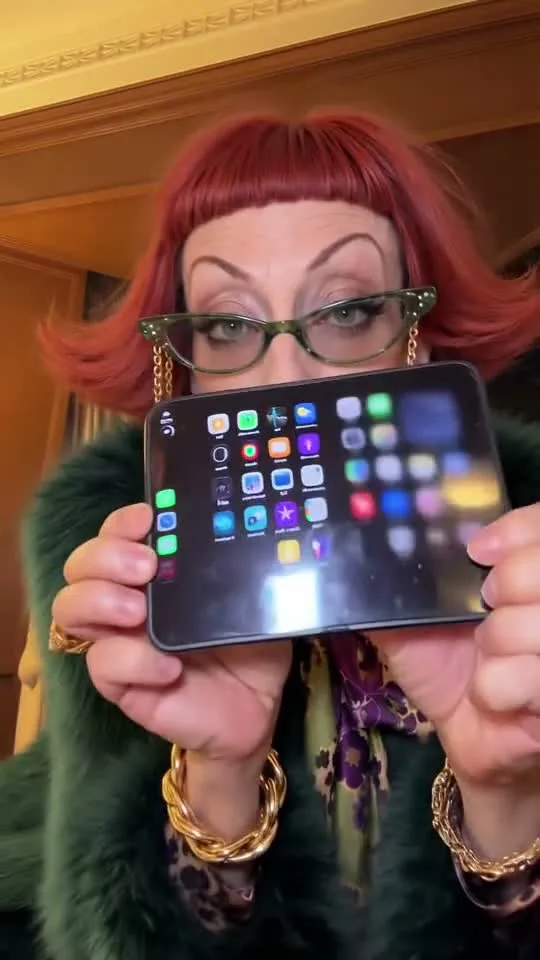
Three moments from one public reference clip show the visual idea. They are not separate Rendastic generations; our preset interprets the scene from your photo.
01 / THE REVEAL
Make the phone the punchline
A normal-sized phone opens into a screen that is much too big. The close-up gives the prop room to surprise while keeping the dancer’s expression visible.
- Start with a clear, front-facing portrait.
- Keep the screen below the eyes.
- The prepared prompt uses a fictional phone with no brand logo.
02 / THE STEP BACK
Give the dance some room
The dancer steps back into the room, revealing the outfit and the nighttime skyline. That change from a close-up to a full-body view gives the short clip its second beat.
- A waist-up or full-body source gives more clothing detail.
- Use one person rather than a group photo.
- Change the room or outfit direction in the editor if you want a different look.
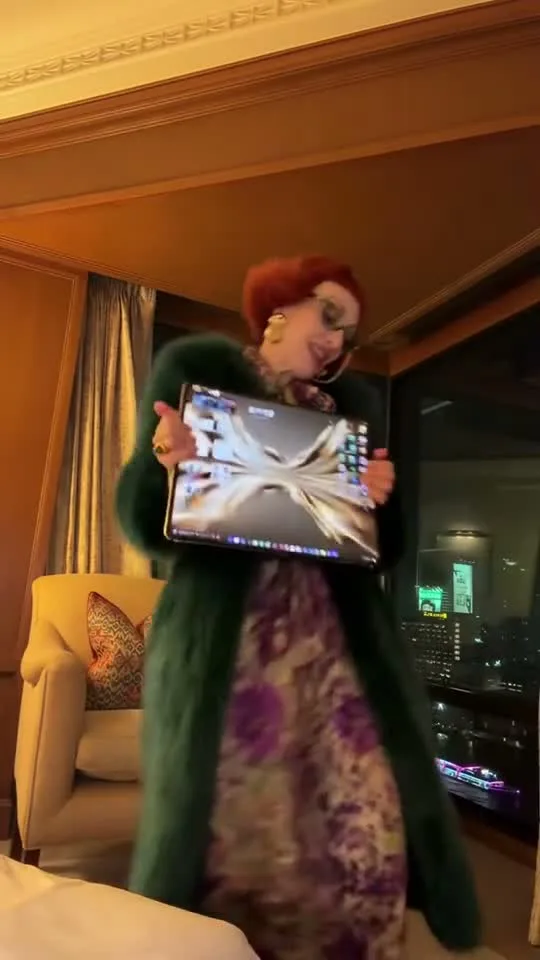
03 / THE PAYOFF
Finish with a playful phone dance
Shoulder bounces, small side steps and an amused look finish the joke. Our prepared version keeps the phone in the dancer’s hands and ends on a pose you can use before a loop or caption.
- The prompt is editable; it is not a motion-copy template.
- The default export is silent.
- Add a soundtrack you are allowed to use in your social app.

MADE TO BE CUSTOMIZED
Your version starts with one photo
No dance clip to record
Use one photo of yourself or an adult who has agreed to appear. The prepared prompt supplies the phone reveal, room and movement.
A scene you can change
Review the complete prompt in the editor. Adjust the outfit, lighting or dance direction before you spend credits.
A vertical 15-second starting point
The preset opens at 9:16 and 480p with Wan 3.0. The live credit quote updates when you change supported settings.
YOUR SCENE, YOUR DIRECTION
What is the iPhone Kupi AI dance?
The folding-phone version of iPhone Kupi turns a phone reveal into an exaggerated dance: a growing screen, a proud pose and a hotel-room performance. This page prepares that visual idea from one photo. It is a creative interpretation, not a face swap onto the reference clip or an official Apple product demonstration.
To show a phone or an outfit without following the full dance, choose one clear product or portrait frame. Try image to video with a slow reveal, checking screen text, fingers and product details before publishing.
Customize this sceneChoose a photo with room to move
- Use a sharp photo with one adult facing the camera.
- Include the upper body and hands; a full-body photo gives the model more outfit detail.
- Avoid a phone, sunglasses or another object covering the face.
- Upload JPEG, PNG or WebP within the editor’s 10 MB limit.
- Your source does not need a hotel background or an actual folding phone.
FROM PHOTO TO FINISHED TAKE
Make your iPhone Kupi-inspired video
Add your photo
Choose one clear photo. It stays attached as you move from this page into the editor.
Review the scene and credits
Open the prepared phone-dance prompt, adjust what you want and check the model, duration and credit quote. Opening the editor does not start a generation.
Generate, download and add sound
Confirm generation in the editor. When it completes, download the video while available and add your own licensed or platform-approved soundtrack.
FIND YOUR WAY TO THE MEME
Choose how to make the folding-phone scene
Both workflows start from a photo. Compare the actual setup and audio handling rather than assuming the same credit number means the same price.
Swipe or scroll sideways to compare all tools
| Your decision | RendasticEditable iPhone Kupi-inspired presetThis template | MakeViraliPhone Kupi Dance AI template |
|---|---|---|
| Photo input | One adult photo; no original dance footage required. | One photo, according to its template page. |
| Starting output | 15 seconds, 480p, vertical 9:16 with Wan 3.0. | Its template page advertises a 15-second vertical clip. |
| Creative setup | Open the prepared prompt and change the room, outfit or dance direction before generation. | A dedicated one-photo template with the phone reveal and hotel-room scene. |
| Audio | Sound off by default; add permitted audio after download. | The template page advertises a clip with sound. |
| Credit quote | 290 Rendastic credits · 15s / 480p | 228 MakeViral credits displayed when checked; credits are not comparable between sites. |
Public workflow descriptions checked on October 29, 2026. No side-by-side generation or output-quality comparison was performed. Third-party settings and prices can change.
Sources checked : MakeViral iPhone Kupi template and public reference
Use Rendastic when you want to start with the folding-phone idea and edit the direction before generating.
Make my iPhone Kupi videoABOUT THIS CREATION
Make the joke your own
Make the scene yours. Use photos you have permission to process and share the result responsibly.
- Use your own photo or get permission from the person pictured.
- The public reference is for viewing only; it is not sent as your generation input.
- The preset creates a fictional folding phone and a new dance. It does not supply the original song or copy exact choreography.
- Rendastic is not affiliated with Apple, the song’s artists or the creators of the reference video.
BEFORE YOU UPLOAD
Your photo and your credits
Know where your photo goes
Rendastic removes the local upload within one hour. Generation providers process a copy; their public upload links may last up to 72 hours or 30 days, depending on the provider. Read the Privacy Policy before uploading sensitive material.
Check the quote before creating
This preset uses paid credits. The exact amount is shown in the editor, and the one-time packs below show whole videos at the prepared settings. Opening the editor does not spend credits.
PAY ONCE. MAKE IT YOURS.
Choose your one-time pack
Pick how many videos you want to make. No subscription. No automatic renewal.
At this template’s starting settings: 15s · 480p · 290 credits per video.
START HERE
Credits for
5 videos
$22.99one-time
1600 credits included
- No subscription or automatic renewal
- Credits valid for 12 months
- Use remaining credits on other creations
ONE-TIME PACK
Credits for
7 videos
$29.99one-time
2150 credits included
- No subscription or automatic renewal
- Credits valid for 12 months
- Use remaining credits on other creations
ONE-TIME PACK
Credits for
15 videos
$59.99one-time
4350 credits included
- No subscription or automatic renewal
- Credits valid for 12 months
- Use remaining credits on other creations
Need more? See larger one-time packs
ONE-TIME PACK
Credits for
25 videos
$99.00one-time
7300 credits included
- No subscription or automatic renewal
- Credits valid for 12 months
- Use remaining credits on other creations
Counts use this template’s starting settings and pack credits only. Changing the model or settings changes how many you can make. Review the quote before generating. Any daily free creations are extra.
Create regularly?
Explore subscription plansPrices in USD; applicable taxes appear before payment. See credit pack terms and the Terms of Service. Choosing a pack does not start a generation.
A FEW THINGS WORTH KNOWING
iPhone Kupi Dance questions
How do I make an iPhone Kupi AI dance video?
Upload one adult photo and open the editor. Review the folding-phone dance prompt, model and credit quote, then confirm generation. The starting preset is a 15-second 9:16 video at 480p using Wan 3.0.
Do I need a folding phone or an existing dance video?
No. One clear photo is enough to prepare the workflow. The prompt asks the model to create a fictional oversized phone and the dance scene; the reference video is not used as an input.
What photo works best?
Use a front-facing waist-up or full-body photo of one adult with a clear face and visible hands. Avoid objects covering the face. JPEG, PNG and WebP are supported within the 10 MB upload limit.
Does it include the iPhone Kupi song?
No. Sound is off in this preset, and the display reference has its audio removed. Add audio you have permission to use after downloading, for example through a social platform’s licensed music library.
Can I change the outfit, hotel room or dance?
Yes. The prepared prompt is editable in the editor. It starts by preserving your recognizable outfit and placing you in a warmly lit room. Change the direction before generating; complex phone and hand movements can vary between outputs.
How much does this video cost?
At the prepared settings, the quote is 290 Rendastic credits · 15s / 480p. One-time packs below show whole-video counts using the current catalog. Changing the model, resolution or duration changes the quote. The editor shows the cost before you generate.
Is the example a video made by Rendastic?
No. It is an attributed public trend reference via MakeViral. The three stills come from that same clip. Our native preset is independently written and has not been verified by a paid test generation; your result will be a new interpretation.
What happens if generation fails?
Confirmed failed generations follow Rendastic’s credit-return policy. A supplier request with an uncertain result remains pending for reconciliation instead of being submitted again. Check its status in your creations; do not repeatedly submit the same request.
MAKE YOUR NEXT TAKE
Give your next phone reveal a dance break
One photo, one oversized screen and your own direction. Prepare the scene, review the credits and make it yours.
Use iPhone Kupi Dance template View one-time packs