IMAGE GENERATION & REFERENCE EDITING
MiniMax H3 ImageOne idea. A considered image.
Build a new scene from words, or bring your own images into a precise edit. Choose a canvas, describe what should change, and keep the details that matter.
Paid credits · Example 2K square, no references: 25 credits · Review your exact quote before confirming
Input & credit rules
Paid tasks are charged only after a completed result is available. The first two input-policy rejections return a free attempt; from the third, a rejected free request uses one free attempt. Technical failures do not count.
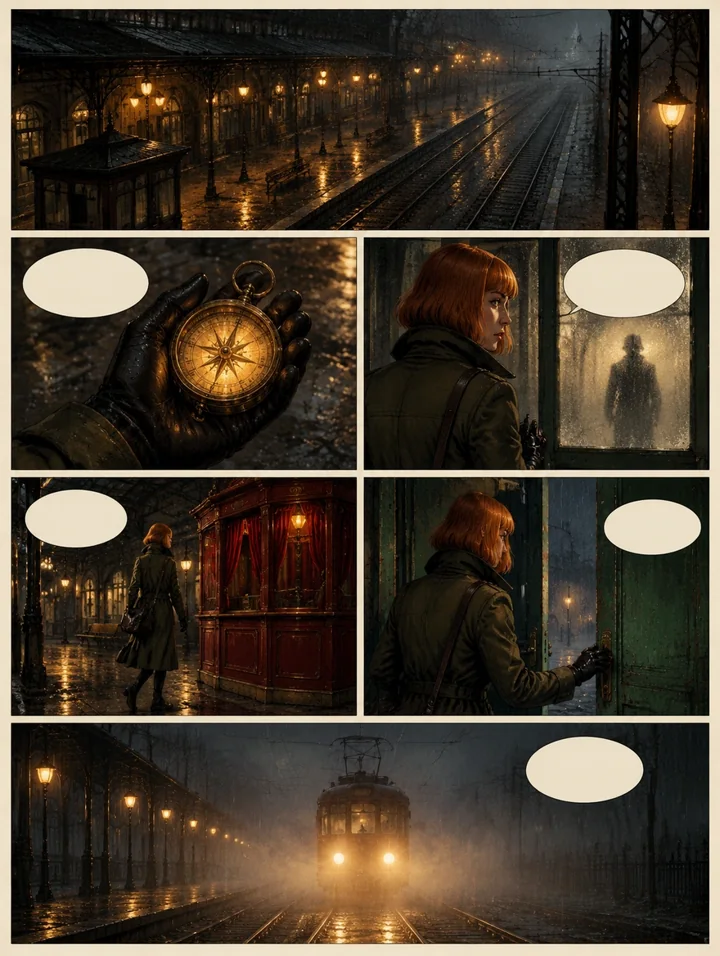
Create a six-panel noir comic page about a detective entering a rainy city cafe and discovering a mysterious red envelope. Use crisp black ink outlines, hand-painted muted colors, warm lamps against cool rain, dramatic shadows and textured cream paper. Keep the detective and cafe visually consistent across panels. Clear page gutters and an expressive close-up in the final panel. Leave speech bubbles blank so I can add my own dialogue. Original characters and story, no existing franchise, logos or signatures.
Illustrative template sample · Results vary by model
Your next idea, in motion.
Your generated video will appear here.Generating your video…
You can keep this page open or come back shortly.My Work
Your generated images, videos and audio.
Downloads: 7 days after completion · Recent history: 7 days
One still image per task · Up to 7 authorized references · 1K / 2K / 4K area tiers · H3 Image is not included in the daily free allowance.
FROM A BRIEF TO A FINISHED IMAGE
Make the model work for your brief.
Reviewed November 13, 2026 · MiniMax release materials and the documented integration contract. No local speed or quality benchmark is claimed.
What is MiniMax H3 Image?
Released by MiniMax in November 2026, H3 Image combines text-to-image creation and reference-led editing. It is a still-image model. The MiniMax H3 video models are separate choices; selecting H3 Image does not create a movie.
A canvas for the finished piece
Rendastic exposes 1K, 2K and 4K output-area tiers, with square, landscape, portrait and wide ratios. These describe area and shape together: a 4K portrait is not a 4096-pixel square. Check the delivered file for its actual pixel dimensions. One image is generated per request here.
Give every reference a clear job
Use Image editing for one to seven authorized reference images. Call them image 1, image 2 and so on, following upload order. Say which image defines the subject, which supplies an object, and which sets the scene. Then list what must remain unchanged. More references add to the quoted cost. The native model allows sixteen references; Rendastic currently exposes seven within its existing upload limits.
Write text as part of the layout
For a poster or label, put the exact wording in quotation marks. Specify its position, hierarchy, contrast and surrounding empty space. Keep the first version short enough to inspect. Review spelling and legibility at the final viewing size; generated lettering is not guaranteed to be exact.
Choose the file you actually need
JPEG, PNG and WebP are available. PNG output does not mean transparent output: this model has no transparent-background or mask control here. Negative prompts, fixed seeds, animation and vector output are also unavailable. For GIFs, SVGs or guided drawing edits, compare GPT Image 2.6.
Keep edits small and observable
Start with one change: replace an object, recolor a jacket or move the scene to a new setting. Describe the subject, framing and lighting that should stay. Inspect edges, hands, reflections, small text and product geometry before treating the result as finished. An instruction to preserve something is guidance, not a pixel-perfect promise.
How credits and delivery work
H3 Image uses paid credits and is not part of the ordinary daily free allowance. The editor shows a fixed quote for your selected settings and references before confirmation. Paid credits are charged once after the original result has been saved and is accessible. Completed originals remain available for seven days; input files have a one-hour retention window.
Which image model should I choose?
Use H3 Image for still images and multi-reference composition. GPT Image 2.6 adds GIF, SVG and drawing-guided workflows. The ordinary free text-image option uses FLUX; ordinary free single-reference edits use Muse when available. Choosing H3 Image keeps this paid model selected instead of silently substituting a free engine.
THREE DECISIONS THAT MATTER
Create with a clear purpose.
- 01
Choose the input
Start from text, or choose Image editing and upload references in a deliberate order.
- 02
Set the canvas and quote
Choose an area tier, shape and file format. Check the credit quote including references.
- 03
Inspect and download
Confirm the task once. Inspect the completed original and download it within seven days.
A STARTING POINT, NOT A CLAIM
Prompts you can make your own.
Original, untested prompt starters. Using a prompt prepares the named available model; it never starts generation.
START FROM TEXT
A restrained product scene
A matte forest-green ceramic teapot on a pale stone plinth. One soft window light from the left, a warm grey background, subtle contact shadow and no other objects. Frame the entire handle and spout. Leave generous empty space above the product. Editorial product photograph, natural surface texture.
Start at 2K with a square canvas; original prompt, not a tested output.
START FROM TEXT
A poster with a reading order
Design a portrait poster for a fictional botanical exhibition. Large headline at the top: "AFTER THE RAIN". Below it, one finely detailed fern leaf against deep ink blue. Small footer: "A botanical study". Use warm ivory lettering, a clear reading order and generous margins. No additional words.
Check the exact wording after generation; original prompt, not a tested output.
REFERENCE EDIT
Change an object, preserve the room
In image 1, replace only the empty vase on the table with the ceramic bowl shown in image 2. Match the bowl to the existing camera angle, scale and window light. Keep the room, table, chairs, wall color and all other objects unchanged.
Upload your room first and bowl second. References must be yours or used with permission.
REFERENCE EDIT
Combine a subject and a setting
Place the bicycle from image 1 beside the cafe window in image 2. Preserve the bicycle frame shape, color, handlebar and wheels. Use the second image for the environment, perspective and evening lighting. Show both wheels fully and create a plausible contact shadow.
Upload the bicycle first and setting second. Inspect geometry and lighting in the result.
BEFORE YOU START
MiniMax H3 Image questions, answered.
Is MiniMax H3 Image available on Rendastic?
Yes. Select MiniMax H3 Image in the image editor for text-to-image creation or reference editing. It uses paid credits; review the quote before confirming.
Is H3 Image the same as MiniMax H3 video?
No. H3 Image creates and edits still images. MiniMax H3 video models have separate settings and workflows.
How many reference images can I use?
Up to seven authorized references in Image editing. Upload them in the order you refer to them as image 1, image 2 and so on. Each reference affects the credit quote. The native model supports sixteen; the current Rendastic editor exposes seven within its existing upload limits.
What resolutions and formats can I select?
Rendastic offers 1K, 2K and 4K area tiers with supported aspect ratios, and JPEG, PNG or WebP output. One image is returned per task. Actual width and height depend on the chosen area and ratio.
Can I make transparent PNGs, GIFs or SVGs?
This model does not offer transparent backgrounds, GIF animation or SVG vectors here. Choose GPT Image 2.6 for those supported workflows and check its settings and price.
Does the daily free allowance include H3 Image?
No. H3 Image uses paid credits. The ordinary free image routes remain FLUX for text-to-image and Muse for single-reference editing, subject to availability and eligibility.
What happens if generation fails?
A new paid task is charged only after its original result is saved and accessible. A failed, refused, canceled or unresolved result is not a completed charge. Do not repeatedly submit an unresolved task.
How long are my images available?
Completed originals are available for seven days after completion through your authorized Rendastic access. Inputs have a one-hour retention window. Download the original while it remains available.
Does Rendastic expose every native H3 Image control?
No. This integration returns one still image per task, supports seven references and preset area/ratio choices, and retains the editor’s 2,000-character prompt limit. Native batch output and custom pixel dimensions are not exposed.